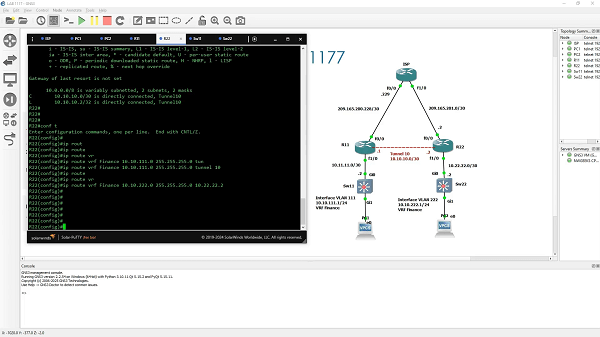
Que tal Álvaro. Muchas gracias por la ayuda!
Agrego la configuración.
R22
R22#
R22#show run
Building configuration…
Current configuration : 1823 bytes
!
! Last configuration change at 19:08:10 UTC Sat Jun 27 2026
upgrade fpd auto
version 15.2
service timestamps debug datetime msec
service timestamps log datetime msec
no service password-encryption
!
hostname R22
!
boot-start-marker
boot-end-marker
!
!
vrf definition Finance
!
address-family ipv4
exit-address-family
!
!
no aaa new-model
no ip icmp rate-limit unreachable
!
!
!
!
!
!
no ip domain lookup
ip cef
no ipv6 cef
!
multilink bundle-name authenticated
!
!
!
!
!
!
!
!
!
!
redundancy
!
!
ip tcp synwait-time 5
!
!
!
!
!
!
!
!
!
!
interface Tunnel10
vrf forwarding Finance
ip address 10.10.10.2 255.255.255.252
tunnel source FastEthernet0/0
tunnel destination 209.165.200.230
!
interface FastEthernet0/0
ip address 209.165.201.2 255.255.255.252
ip ospf 1 area 0
duplex half
!
interface FastEthernet1/0
vrf forwarding Finance
ip address 10.22.22.1 255.255.255.252
duplex auto
speed auto
!
interface FastEthernet1/1
no ip address
shutdown
duplex auto
speed auto
!
interface FastEthernet2/0
no ip address
shutdown
duplex auto
speed auto
!
interface FastEthernet2/1
no ip address
shutdown
duplex auto
speed auto
!
interface FastEthernet3/0
no ip address
shutdown
duplex auto
speed auto
!
interface FastEthernet3/1
no ip address
shutdown
duplex auto
speed auto
!
router ospf 1
!
ip forward-protocol nd
no ip http server
no ip http secure-server
!
!
ip route vrf Finance 10.10.111.0 255.255.255.0 Tunnel10
ip route vrf Finance 10.10.222.0 255.255.255.0 10.22.22.2
!
no cdp log mismatch duplex
!
!
!
control-plane
!
!
!
mgcp profile default
!
!
!
gatekeeper
shutdown
!
!
line con 0
exec-timeout 0 0
privilege level 15
logging synchronous
stopbits 1
line aux 0
exec-timeout 0 0
privilege level 15
logging synchronous
stopbits 1
line vty 0 4
login
transport input all
!
!
end
R22#
———————————-
sw11
Sw11#
Sw11#
Sw11#show run
Building configuration…
Current configuration : 3138 bytes
!
! Last configuration change at 17:18:17 UTC Sat Jun 27 2026
!
version 15.2
service timestamps debug datetime msec
service timestamps log datetime msec
no service password-encryption
service compress-config
!
hostname Sw11
!
boot-start-marker
boot-end-marker
!
!
vrf definition Finance
!
address-family ipv4
exit-address-family
!
!
no aaa new-model
!
!
!
!
!
!
!
!
ip cef
no ipv6 cef
!
!
!
spanning-tree mode rapid-pvst
spanning-tree extend system-id
!
vlan internal allocation policy ascending
!
!
!
!
!
!
!
!
!
!
!
!
!
!
interface GigabitEthernet0/1
switchport mode access
media-type rj45
negotiation auto
!
interface GigabitEthernet0/2
media-type rj45
negotiation auto
!
interface GigabitEthernet0/3
media-type rj45
negotiation auto
!
interface GigabitEthernet0/0
no switchport
vrf forwarding Finance
ip address 10.11.11.2 255.255.255.252
negotiation auto
!
interface GigabitEthernet1/0
media-type rj45
negotiation auto
!
interface GigabitEthernet1/1
media-type rj45
negotiation auto
!
interface Vlan111
vrf forwarding Finance
ip address 10.10.111.1 255.255.255.0
!
ip forward-protocol nd
!
no ip http server
no ip http secure-server
!
ip route vrf Finance 0.0.0.0 0.0.0.0 10.11.11.1
!
!
!
!
!
control-plane
!
banner exec ^C
———————————————
R11
R11#
R11#show run
Building configuration…
Current configuration : 1823 bytes
!
! Last configuration change at 19:04:05 UTC Sat Jun 27 2026
upgrade fpd auto
version 15.2
service timestamps debug datetime msec
service timestamps log datetime msec
no service password-encryption
!
hostname R11
!
boot-start-marker
boot-end-marker
!
!
vrf definition Finance
!
address-family ipv4
exit-address-family
!
!
no aaa new-model
no ip icmp rate-limit unreachable
!
!
!
!
!
!
no ip domain lookup
ip cef
no ipv6 cef
!
multilink bundle-name authenticated
!
!
!
!
!
!
!
!
!
!
redundancy
!
!
ip tcp synwait-time 5
!
!
!
!
!
!
!
!
!
!
interface Tunnel10
vrf forwarding Finance
ip address 10.10.10.1 255.255.255.252
tunnel source FastEthernet0/0
tunnel destination 209.165.201.2
!
interface FastEthernet0/0
ip address 209.165.200.230 255.255.255.252
ip ospf 1 area 0
duplex half
!
interface FastEthernet1/0
vrf forwarding Finance
ip address 10.11.11.1 255.255.255.252
duplex auto
speed auto
!
interface FastEthernet1/1
no ip address
shutdown
duplex auto
speed auto
!
interface FastEthernet2/0
no ip address
shutdown
duplex auto
speed auto
!
interface FastEthernet2/1
no ip address
shutdown
duplex auto
speed auto
!
interface FastEthernet3/0
no ip address
shutdown
duplex auto
speed auto
!
interface FastEthernet3/1
no ip address
shutdown
duplex auto
speed auto
!
router ospf 1
!
ip forward-protocol nd
no ip http server
no ip http secure-server
!
!
ip route vrf Finance 10.10.111.0 255.255.255.0 10.11.11.2
ip route vrf Finance 10.10.222.0 255.255.255.0 Tunnel10
!
no cdp log mismatch duplex
!
!
!
control-plane
!
!
!
mgcp profile default
!
!
!
gatekeeper
shutdown
!
!
line con 0
exec-timeout 0 0
privilege level 15
logging synchronous
stopbits 1
line aux 0
exec-timeout 0 0
privilege level 15
logging synchronous
stopbits 1
line vty 0 4
login
transport input all
!
!
end
R11#
R11#
—————————————–
SW22
Sw22#
Sw22#show run
Building configuration…
Current configuration : 3138 bytes
!
! Last configuration change at 19:17:29 UTC Sat Jun 27 2026
!
version 15.2
service timestamps debug datetime msec
service timestamps log datetime msec
no service password-encryption
service compress-config
!
hostname Sw22
!
boot-start-marker
boot-end-marker
!
!
vrf definition Finance
!
address-family ipv4
exit-address-family
!
!
no aaa new-model
!
!
!
!
!
!
!
!
ip cef
no ipv6 cef
!
!
!
spanning-tree mode rapid-pvst
spanning-tree extend system-id
!
vlan internal allocation policy ascending
!
!
!
!
!
!
!
!
!
!
!
!
!
!
interface GigabitEthernet0/1
switchport mode access
media-type rj45
negotiation auto
!
interface GigabitEthernet0/2
media-type rj45
negotiation auto
!
interface GigabitEthernet0/3
media-type rj45
negotiation auto
!
interface GigabitEthernet0/0
no switchport
vrf forwarding Finance
ip address 10.22.22.2 255.255.255.252
negotiation auto
!
interface GigabitEthernet1/0
media-type rj45
negotiation auto
!
interface GigabitEthernet1/1
media-type rj45
negotiation auto
!
interface Vlan222
vrf forwarding Finance
ip address 10.10.222.1 255.255.255.0
!
ip forward-protocol nd
!
no ip http server
no ip http secure-server
!
ip route vrf Finance 0.0.0.0 0.0.0.0 10.22.22.1
!
!
!
!
!
control-plane
!
banner exec ^C
Sw22#
Sw22#ping vrf Finance 10.10.111.1 source vlan 222
% Invalid source interface – IP not enabled or interface is down
Sw22#

.