Banco de preguntas CCNP ENARSI 300-401 actualizado 23 de febrero 2026
Si ya estudiaste para tu examen de certificación y crees que dominas todos los temas, solo te queda practicar y practicar. Ponemos a tu disposición el banco de preguntas oficial. Respondiendo a estas preguntas, ten la certeza que conseguirás la certificación. Este banco de preguntas se actualiza de manera periódica.
NOTA: Accede a este contenido a través de la compra de la membresía anual, a través de la compra del curso CCNP ENARSI 300-410, o a través de una membresía mensual de 30 USD.
1. Refer to the exhibit. An engineer must troubleshoot a connectivity issue impacting the redistribution of the subnet 172.16.2.48/28 into the OSPF domain. Which configuration on router R1 advertises this subnet into the OSPF domain?
R1#show run | begin router eigrp 100
router eigrp 100
 network 172.16.250.0 0.0.0.3
 redistribute ospf 10 metric 1 1 1 1 1
!
router ospf 10
 network 192.168.1.0 0.0.0.3 area 0
!
ip forward-protocol nd
!
!
no ip http server


R3# traceroute 172.16.2.48
type escape sequence to abort
Tracing the route to 172.16.2.48
VRF info: (vrf in name/id, vrf out name/id)
1  *  *  *
2 *  *  *
3 *  *  *


R3#show ip route
    192.168.1.0/24 is variably subnetted, 2 subnets, 2 masks
C       192.168.1.0/30 is directly connected, GigabitEthernet0/1
L        192.168.1.2/32 is directly connected, GigabitEthernet0/1
    192.168.2.0/24 is variably subnetted, 2 subnets, 2 masks
C       192.168.2.0/24 is directly conectede, Loopback2
L       192.168.2.33/32 is directly connected, Loopback2
    192.168.3.0/24 is variably subnetted, 2 subnets, 2 masks
C       192.168.3.0/24 is directly connected, Loopback1
L       192.168.3.17/32 is directly connected, Loopback1


R4#show running-config | begin router eigrp
router eigrp 100
 network 172.16.2.0 0.0.0.3
 network 172.16.2.16 0.0.0.15
 network 172.16.2.32 0.0.0.15
 redistribute static metric 100 1 1 1 1 route-map CCNP
!
ip forward-protocol nd
!
no ip http server
no ip http sercure-server
ip route 172.16.2.48 255.255.255.240 172.16.2.34
!
route-map CCNP permit 10
 match ip address 10
 set tag 200
!
!
access-list 10 permit 172.16.2.48 0.0.0.15
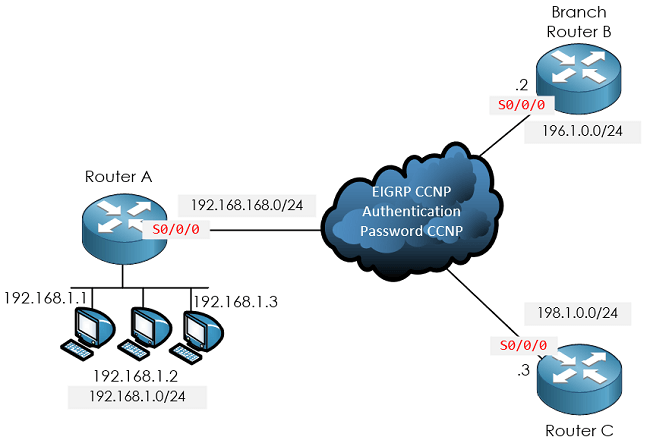
2. Refer to the exhibit. The services at branch B are down. An engineer notices that router A and router B are not exchanging any routes. Which configuration resolves the issue on router B?
RouterA#debug eigrp packets

(UPDATE, REQUEST, QUERY, REPLY, HELLO, UNKNOWN, PROBE, ACK, STUB, SIAQUERY, SIAREPLY)
EIGRP Packet debugging is on
RouterA#
*Jan 14 16:39:24.927: EIGRP: Gil: ignored packet from 192.168.168.2, opcode 5 (missing authentication)
*Jan 14 16:39:25.619: EIGRP: Sending HELLO on Gil
paklen 60
*Jan 14 16:39:25.619: AS 100, Flags 0x0: (NULL), Seq 0/0 interfaceQ 0/0 iidbo un/rely 0/0
RouterA#
A.
router eigrp 100
network 192.168.168.0
key chain EIGRP
key 1
key-string CCNP
interface serial 0/0/0
ip address 192.168.168.2 255.255.255.0
ip authentication key-chain eigrp 100 EIGRP
negotiation auto
B.
router eigrp 100
network 192.168.168.0
key chain CCNP
key 1
key-string EIGRP
interface serial0/0/0
ip address 192.168.168.2 255.255.255.0
ip authentication mode eigrp 100 md5
ip authentication key-chain eigrp 100 EIGRP
negotiation auto
C.
router eigrp 100
network 192.168.168.0
key chain EIGRP
key 1
key-string CCNP
interface serial0/0/0
ip address 192.168.168.2 255.255.255.0
ip authentication mode eigrp 100 md5
negotiation auto
D.
router eigrp 100
network 192.168.168.0
key chain EIGRP
key 1
key-string CCNP
interface serial0/0/0
ip address 192.168.168.2 255.255.255.0
ip authentication mode eigrp 100 md5
ip authentication key-chain eigrp 100 EIGRP
negotiation auto
3. Refer to the exhibit. An engineer must troubleshoot an issue affecting the communication from router R2 to the TACACS server. Which configuration resolves the issue?
R2(config)#tacacs server advrt
R2 (config-server-tacacs)#key xyz123
C.
R2(config)#tacacs-server packet maxsize 43974
D.
R1 (config)#tacacs server advrt
R1 (config-server-tacacs)#kty xyz123
4. Users report web connectivity problems on the server (10.1.1.10). Which IP SLA configuration captures the failure details through the network to resolve the issue?
A.
ip sla 5
icmp-echo 10.1.1.10
frequency 1
timeout 3
ip sla schedule 5 life forever start-time now
B.
ip sla 5
http get url http://10.1.1.10
frequency 60
timeout 3000
!
ip sla schedule 5 life forever start-time now
C.
ip sla 5
icmp-echo 10.1.1.10
frequency 60
timeout 3000
ip sla schedule 5 life forever start-time now
D.
ip sla 5
http get url http://10.1.1.10
frequency 1
timeout 3
!
ip sla schedule 5 life forever start-time now
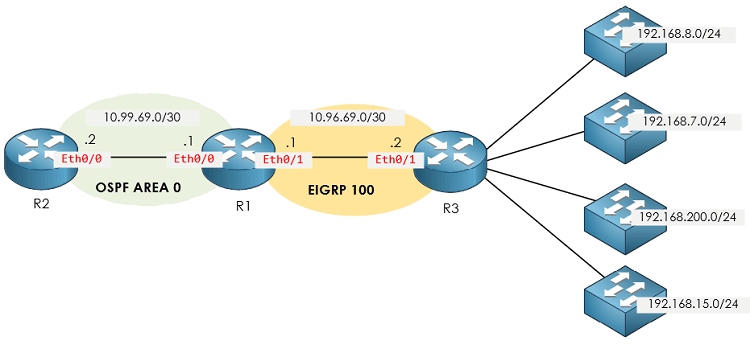
5. Refer to the exhibit. The engineer configured route redistribution in the network but soon received reports that R2 cannot access 192.168.7.0/24 and 192.168.15.0/24 subnets. Which configuration resolves the issue?
R1#show route-map
route-map FROM->EIGRP, permit, sequence 10
Match clauses:
ip address (access-lists): 10
Set clauses:
Policy routing matches: 0 packets, 0 bytes

R1#show run | sec router
router eigrp 100
network 10.96.69.0 0.0.0.3
no auto-summary
eigrp router-id 1.1.1.1
router ospf 100
router-id 1.1.1.1
log-adjacency-changes
redistribute eigrp 100 subnets route-map FROM->EIGRP network 10.99.69.0 0.0.0.3 area 0

R1#show ip access-list
Standard IP access list 10
10 permit 192.168.16.0, wildcard bits 0.0.3.255 11 permit 192.168.0.0, wildcard bits 0.0.7.255 20 deny any
6. Refer to the exhibit. EIGRP adjacency between router A and router C is not working as expected. Which two configurations resolve the issue? (Choose two.)
RouterA#sh ip eigrp interfaces gigabitEthernet 0/0/1 EIGRP-IPv4 Interfaces for AS (1)

Interface       Peers    Xmit Queue     PeerQ              Mean     Pacing Time    Multicast     Pending
                                      Un/Reliable    Un/Reliable     SRTT      Un/Reliable     Flow Timer  Routes
EIGRP-IPv4 VR (CCNP) Address-Family Interfaces for AS (100)
Interface       Peers      Xmit Queue  PeerQ              Mean     Pacing Time    Multicast     Pending
                                      Un/Reliable    Un/Reliable     SRTT      Un/Reliable     Flow Timer  Routes
Gi0/0/1          0                      0/0            0/0               0            0/0           50       0
A.
Router C
router eigrp CCNP
address-family ipv4 unicast autonomous-system 100
af-interface GigabitEthernet0/0/0
hold-time 90
exit-af-interface
topology base
exit-af-topology
exit-address-family
Espero que te encuentres bien. La pregunta 469 relacionada con uRPF. No me queda claro, ya que el comando «ip verify unicast reverse-path» no fue abordado durante la clase. ¿Podrías explicarme un poco más al respecto, por favor?
Lo que pasa es que ese comando es la antigua forma de activar URPF, me parece que es una pregunta que busca generar confusión debido a los resultados de los comandos show, ya que, si te fijas en las respuestas, en realidad deberíamos ver «IP unicast RPF check is enabled» y «Input features: uRPF» en las interfaces donde se tenga activada la característica. Sin embargo, en la interface e0/1, solamente ves el texto «IP unicast RPF check is enabled», lo que podría hacernos pensar que tal vez en esta interface no se encuentra activado URPF, y sí en la 0/0. Si asumimos que es así, ya descartamos las opciones A y C. De las opciones B y D, descartamos la D, ya que no existe el comando «ip unicast RPF check reachable-via any allow-default allow-self-ping», dejando como única opción la B.
Si no analizamos esta pregunta de esta manera, la opción A o B podrían ser correctas y no veo la forma de elegir una sobre otra.
Atento a tus comentarios.
Saludos! =)
Esta respuesta fue modificada hace 2 años, 6 meses por AlvaroM.
474. Refer to the exhibit. The administrator is troubleshooting a BGP peering between PE1 and PE3 that is unable to establish. Which action resolves the issue?
Pienso que la respuesta correcta seria la C.- Remove the traffic filtering rules on P2 blocking the BGP communication between PE1 and PE3,
ya que en el debug hay una línea que dice lo siguiente:
Gracias por la observación, la opción correcta es C, cuando se bloquea la comunicación BGP entre 2 dispositivos, tendremos tal cual los logs mostrados en la pregunta. (Lo he simulado y confirmado por si las dudas =) )
Logs recibidos en mi caso (topología R1-R2-R3):
*Aug 16 13:14:30.391: TCP: sending SYN, seq 3969043345, ack 0
*Aug 16 13:14:30.391: TCP0: Connection to 30.30.30.30:179, advertising MSS 1460
*Aug 16 13:14:30.395: TCP0: state was CLOSED -> SYNSENT [28136 -> 30.30.30.30(179)]
*Aug 16 13:14:30.447: ICMP: dst (10.10.10.10) administratively prohibited unreachable rcv from 12.12.12.2
*Aug 16 13:14:30.451: TCP0: ICMP destination unreachable received
*Aug 16 13:14:30.451: Released port 28136 in Transport Port Agent for TCP IP type 1 delay 240000
*Aug 16 13:14:30.451: TCP0: state was SYNSENT -> CLOSED [28136 -> 30.30.30.30(179)]
*Aug 16 13:14:30.459: TCB 0x6B0C7930 destroyed
R1#

ACL router intermedio:
R2#show access-lists
Extended IP access list 199
    10 deny tcp host 10.10.10.10 host 30.30.30.30 eq bgp (27 matches)
    20 permit ip any any (39 matches)
Respecto a la pregunta 444. Which action installs route 192.168.2.2/32 in the routing table?
Creo que la respuesta es la
B. Configure the next-hop-self attribute for the peering on the peer router
Ya que el vecino «192.168.1.1» esta anunciando la ruta redistribuida «?» – 192.168.2.2/32, entonces, en ese vecino se debe configura el next-hop-self para cambiar el salto.
Hola Daniel, nuevamente gracias por la observación, es correcto, la respuesta correcta es la B, el vecino debe enviarnos la ruta con el siguiente salto modificado para que sea válida, de manera que podamos instalarla en la tabla de enrutamiento.
Respecto a la pregunta 402, vayamos descartando las incorrectas. De entrada la D no puede ser, ya que en Detroit se tiene el comando «ip nhrp map broadcast», lo cual es incorrecto. La C no puede ser debido a que se utiliza de manera incorrecta el comando ip nhrp map, el comando correcto debería ser «ip nhrp map 10.0.81.1 10.92.18.2» (reno), el orden de las IPs es incorrecto. En la opción A, falta el comando «tunnel mode gre multipoint» en el router reno, lo cual deja como única opción correcta a la B.
Respecto a la 400, ya se han completado las opciones disponibles.
En esta oportunidad quiero felicitar a Jorge Alberto Montero de México por lograr su certificación CCNP ENARSI el día de hoy! Felicidades Jorge, y gracias por confiar en nuestros materiales tanto para CCNP ENCOR como para ENARSI.
Esperamos verte pronto en futuros cursos.
¡Saludos y a disfrutar de tu certificado CCNP ENTERPRISE! =DD