Banco de preguntas CCNP ENARSI 300-401 actualizado 23 de febrero 2026
Si ya estudiaste para tu examen de certificación y crees que dominas todos los temas, solo te queda practicar y practicar. Ponemos a tu disposición el banco de preguntas oficial. Respondiendo a estas preguntas, ten la certeza que conseguirás la certificación. Este banco de preguntas se actualiza de manera periódica.
NOTA: Accede a este contenido a través de la compra de la membresía anual, a través de la compra del curso CCNP ENARSI 300-410, o a través de una membresía mensual de 30 USD.
1. Refer to the exhibit. An engineer must troubleshoot a connectivity issue impacting the redistribution of the subnet 172.16.2.48/28 into the OSPF domain. Which configuration on router R1 advertises this subnet into the OSPF domain?
R1#show run | begin router eigrp 100
router eigrp 100
 network 172.16.250.0 0.0.0.3
 redistribute ospf 10 metric 1 1 1 1 1
!
router ospf 10
 network 192.168.1.0 0.0.0.3 area 0
!
ip forward-protocol nd
!
!
no ip http server


R3# traceroute 172.16.2.48
type escape sequence to abort
Tracing the route to 172.16.2.48
VRF info: (vrf in name/id, vrf out name/id)
1  *  *  *
2 *  *  *
3 *  *  *


R3#show ip route
    192.168.1.0/24 is variably subnetted, 2 subnets, 2 masks
C       192.168.1.0/30 is directly connected, GigabitEthernet0/1
L        192.168.1.2/32 is directly connected, GigabitEthernet0/1
    192.168.2.0/24 is variably subnetted, 2 subnets, 2 masks
C       192.168.2.0/24 is directly conectede, Loopback2
L       192.168.2.33/32 is directly connected, Loopback2
    192.168.3.0/24 is variably subnetted, 2 subnets, 2 masks
C       192.168.3.0/24 is directly connected, Loopback1
L       192.168.3.17/32 is directly connected, Loopback1


R4#show running-config | begin router eigrp
router eigrp 100
 network 172.16.2.0 0.0.0.3
 network 172.16.2.16 0.0.0.15
 network 172.16.2.32 0.0.0.15
 redistribute static metric 100 1 1 1 1 route-map CCNP
!
ip forward-protocol nd
!
no ip http server
no ip http sercure-server
ip route 172.16.2.48 255.255.255.240 172.16.2.34
!
route-map CCNP permit 10
 match ip address 10
 set tag 200
!
!
access-list 10 permit 172.16.2.48 0.0.0.15
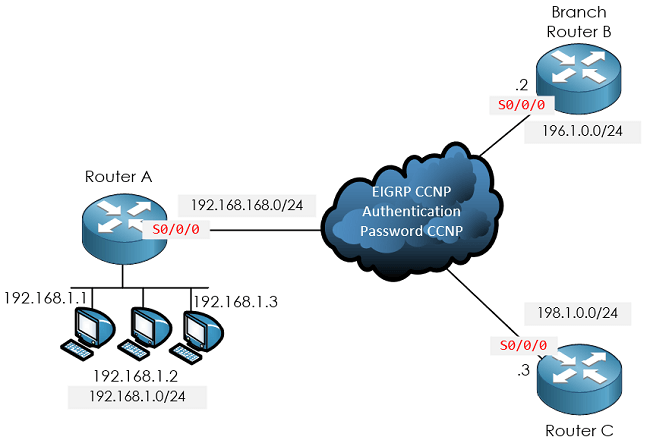
2. Refer to the exhibit. The services at branch B are down. An engineer notices that router A and router B are not exchanging any routes. Which configuration resolves the issue on router B?
RouterA#debug eigrp packets

(UPDATE, REQUEST, QUERY, REPLY, HELLO, UNKNOWN, PROBE, ACK, STUB, SIAQUERY, SIAREPLY)
EIGRP Packet debugging is on
RouterA#
*Jan 14 16:39:24.927: EIGRP: Gil: ignored packet from 192.168.168.2, opcode 5 (missing authentication)
*Jan 14 16:39:25.619: EIGRP: Sending HELLO on Gil
paklen 60
*Jan 14 16:39:25.619: AS 100, Flags 0x0: (NULL), Seq 0/0 interfaceQ 0/0 iidbo un/rely 0/0
RouterA#
A.
router eigrp 100
network 192.168.168.0
key chain EIGRP
key 1
key-string CCNP
interface serial 0/0/0
ip address 192.168.168.2 255.255.255.0
ip authentication key-chain eigrp 100 EIGRP
negotiation auto
B.
router eigrp 100
network 192.168.168.0
key chain CCNP
key 1
key-string EIGRP
interface serial0/0/0
ip address 192.168.168.2 255.255.255.0
ip authentication mode eigrp 100 md5
ip authentication key-chain eigrp 100 EIGRP
negotiation auto
C.
router eigrp 100
network 192.168.168.0
key chain EIGRP
key 1
key-string CCNP
interface serial0/0/0
ip address 192.168.168.2 255.255.255.0
ip authentication mode eigrp 100 md5
negotiation auto
D.
router eigrp 100
network 192.168.168.0
key chain EIGRP
key 1
key-string CCNP
interface serial0/0/0
ip address 192.168.168.2 255.255.255.0
ip authentication mode eigrp 100 md5
ip authentication key-chain eigrp 100 EIGRP
negotiation auto
3. Refer to the exhibit. An engineer must troubleshoot an issue affecting the communication from router R2 to the TACACS server. Which configuration resolves the issue?
R2(config)#tacacs server advrt
R2 (config-server-tacacs)#key xyz123
C.
R2(config)#tacacs-server packet maxsize 43974
D.
R1 (config)#tacacs server advrt
R1 (config-server-tacacs)#kty xyz123
4. Users report web connectivity problems on the server (10.1.1.10). Which IP SLA configuration captures the failure details through the network to resolve the issue?
A.
ip sla 5
icmp-echo 10.1.1.10
frequency 1
timeout 3
ip sla schedule 5 life forever start-time now
B.
ip sla 5
http get url http://10.1.1.10
frequency 60
timeout 3000
!
ip sla schedule 5 life forever start-time now
C.
ip sla 5
icmp-echo 10.1.1.10
frequency 60
timeout 3000
ip sla schedule 5 life forever start-time now
D.
ip sla 5
http get url http://10.1.1.10
frequency 1
timeout 3
!
ip sla schedule 5 life forever start-time now
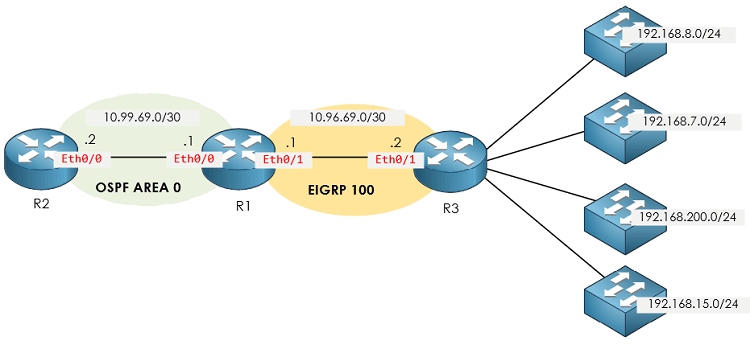
5. Refer to the exhibit. The engineer configured route redistribution in the network but soon received reports that R2 cannot access 192.168.7.0/24 and 192.168.15.0/24 subnets. Which configuration resolves the issue?
R1#show route-map
route-map FROM->EIGRP, permit, sequence 10
Match clauses:
ip address (access-lists): 10
Set clauses:
Policy routing matches: 0 packets, 0 bytes

R1#show run | sec router
router eigrp 100
network 10.96.69.0 0.0.0.3
no auto-summary
eigrp router-id 1.1.1.1
router ospf 100
router-id 1.1.1.1
log-adjacency-changes
redistribute eigrp 100 subnets route-map FROM->EIGRP network 10.99.69.0 0.0.0.3 area 0

R1#show ip access-list
Standard IP access list 10
10 permit 192.168.16.0, wildcard bits 0.0.3.255 11 permit 192.168.0.0, wildcard bits 0.0.7.255 20 deny any
6. Refer to the exhibit. EIGRP adjacency between router A and router C is not working as expected. Which two configurations resolve the issue? (Choose two.)
RouterA#sh ip eigrp interfaces gigabitEthernet 0/0/1 EIGRP-IPv4 Interfaces for AS (1)

Interface       Peers    Xmit Queue     PeerQ              Mean     Pacing Time    Multicast     Pending
                                      Un/Reliable    Un/Reliable     SRTT      Un/Reliable     Flow Timer  Routes
EIGRP-IPv4 VR (CCNP) Address-Family Interfaces for AS (100)
Interface       Peers      Xmit Queue  PeerQ              Mean     Pacing Time    Multicast     Pending
                                      Un/Reliable    Un/Reliable     SRTT      Un/Reliable     Flow Timer  Routes
Gi0/0/1          0                      0/0            0/0               0            0/0           50       0
A.
Router C
router eigrp CCNP
address-family ipv4 unicast autonomous-system 100
af-interface GigabitEthernet0/0/0
hold-time 90
exit-af-interface
topology base
exit-af-topology
exit-address-family
Sorry, respecto a la pregunta 662 está bien la B) como comentasteis.
R1 está sumarizando 4 rutas directamente conectadas (las de sus loopbacks), por tanto es en R1 donde hay que aplicar el comando de no auto-summary para que no se instale la ruta sumarizada en su tabla de enrutamiento y por tanto tampoco la anuncie a R2 de esa manera, sino individualizadas unicamente.
Por que seria preferible la respuesta A) Use the input-queue command to prevent the loss of packets a la B) Use RIP V2 to be able to use classless networks from BGP ?
En la question 651 porque la respuesta es la B. R1 should configure the ip summary-address eigrp 10.0.0.0 255.0.0.0 command under the Fast Ethernet 0/0 interface ?
Tenia entendido que el router que debe sumarizar las rutas es el que las anuncia no el que las recibe.
Respecto a la 661, esto te lo dice directamente Cisco, si tenemos un «high-end» router que envía información a un «low-speed/lower end» router, debemos considerar ejecutar el comando input-queue en el proceso RIP para que se pueda evitar la perdida de paquetes y posterior ausencia de rutas en la tabla de enrutamiento. Este comando controla cuanta información de rutas puede mantener en cola para su posterior procesamiento a medida que le van llegando gran cantidad de paquetes Update.
En la pregunta 641, para configurar EIGRP con VRF, indicais que la respuesta correcta es la B) Configure the network command under EIGRP address family vrf CLIENT1
Respecto a la 651, sí, es un error de enunciado, de todas formas la respuesta se mantiene. La única posibilidad que tenemos respecto al vecino que envía rutas al router R1, es la B. Ya hemos adaptado las descripciones de las respuestas.
Respecto a la 641, lo que pasa es que la opción D no hace referencia a ningún VRF, el que nos digan «under EIGRP address family ipv4?» podría hacer referencia simplemente a la configuración tradicional de EIGRP en named mode (sin VRF). Elegimos la B por ser más específica.
En este caso deberíamos utilizar Loose Mode para que el tráfico pueda volver por una interface diferente a la que figura en la tabla de enrutamiento. Por lo tanto la respuesta correcta incluye la utilización del comando «any», y adicional el comando «allow default» para permitir la coincidencia de la IP de origen con la ruta por defecto, de lo contrario muchos paquetes serían descartados al no existir rutas específicas que hagan coincidencia con la IP de origen de los paquetes que vienen del ISP. Por lo tanto la opción B es más adecuada. Gracias por la observación. También hemos completado el enunciado (le faltaba una parte).
Saludos!
Esta respuesta fue modificada hace 1 mes, 3 semanas por AlvaroM.